Patriotic Craft SVG: 4th of July Distressed Flag Design
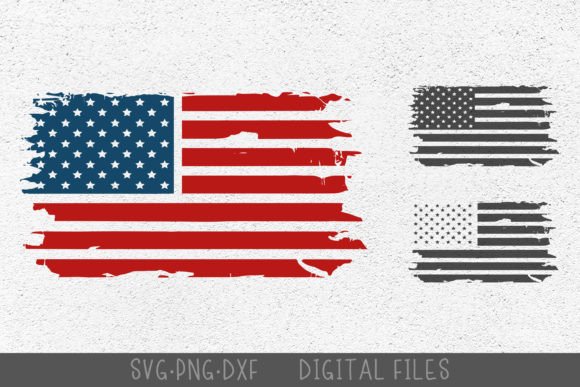
Celebrating Independence Day with handmade crafts is a beloved tradition, and having the right digital design assets can make all the difference. The 4th of July American Distressed Flag SVG from CraftyKittyArt offers a beautifully weathered, vintage aesthetic perfect for a wide range of patriotic projects. This versatile design template provides the foundation for creating professional-looking decorations, apparel, and home decor with a classic, time-worn feel.
This digital craft template is designed for maximum flexibility and ease of use. Upon purchase, you receive a single zip archive containing the distressed flag design in multiple file formats: SVG, DXF, and PNG. Each format is optimized for popular crafting machines and software. The SVG file is compatible with Cricut Design Space and Glowforge for cutting and engraving, while the DXF file works seamlessly with Silhouette Studio and other CNC laser machines. The high-resolution PNG file is ready for printing and also works within Circut's ecosystem.
Creative Applications for Your Distressed Flag Design
The charm of this distressed flag design lies in its versatility. It's not just for one specific project; it's a multi-purpose design asset that can elevate numerous creative endeavors. Consider these popular applications:
- Apparel & Accessories: Create standout t-shirts, hats, tote bags, and bandanas for 4th of July barbecues, parades, or family reunions.
- Home Decor: Craft beautiful wall art, throw pillows, wooden signs, and festive banners to decorate your home for the holiday.
- Party Supplies: Design custom invitations, cupcake toppers, napkin rings, and table centerpieces that carry a cohesive patriotic theme.
- Gifts & Merchandise: Personalize mugs, keychains, coasters, and notebooks to create thoughtful, handmade gifts or small-batch merchandise.
Each design is sized at 7.5 inches on its longest side, providing a great starting point for various projects. One of the key benefits of vector-based files like the SVG and DXF is their scalability. You can easily resize the design in your cutting software without losing any quality, making it suitable for both small decals and large banners.
Tips for Selecting and Using Digital Design Templates
When choosing a design template like this distressed flag, thinking ahead about your project's needs ensures a smooth creative process. Here are a few practical tips:
- Test the Mood: The distressed, vintage texture is ideal for projects aiming for a rustic, nostalgic, or classic American feel. It may pair best with serif or slab serif fonts for a cohesive look.
- Plan Your Materials: This design is noted as most perfect for vinyl, printing, and engraving. Consider how the distressed details will translate onto your chosen material, whether it's smooth vinyl for a car decal or wood for an engraved plaque.
- Customize with Confidence: The colors shown in the preview are examples. You have full control to change the colors to match your specific project palette within your design software before cutting or printing.
- Understand the License: Familiarize yourself with the terms of use. The design can be used to create physical end products for sale, which is great for crafters and small business owners. However, reselling the digital source files is not permitted.
Investing in well-crafted digital design assets like this one streamlines your workflow and provides a professional starting point. It saves you time from creating complex designs from scratch while offering the flexibility to personalize every project. The right template helps maintain visual consistency across your creations, whether for a personal celebration or a commercial product line, ensuring a polished and professional final presentation that truly captures the spirit of the occasion.